在這里了解當今互聯網的最新動態
在這里了解當今
什么是Canvas?
HTML5 的 Canvas 元素使用 JavaScript 在網頁上繪制圖像。
畫布是一個矩形區域,你可以控制其每一像素。
canvas 擁有多種繪制路徑、矩形、圓形、字符以及添加圖像的方法。
創建 Canvas 元素
向 HTML5 頁面添加 Canvas 元素。
規定元素的 id、寬度和高度:
通過 JavaScript 來繪制
Canvas 元素本身是沒有繪圖能力的。所有的繪制工作必須在 JavaScript 內部完成:
var c=document.getElementById("myCanvas");
var cxt=c.getContext("2d");
cxt.fillStyle="#FF0000";cxt.fillRect(0,0,150,75);
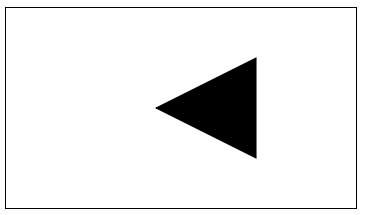
繪圖方法:
JavaScript 代碼:
<script type="text/javascript">
var canvas = document.getElementById("mycanvas");
var context = canvas.getContext("2d");
context.moveTo(250,50);
context.lineTo(150,100);
context.lineTo(250,150);
context.closePath();
context.stroke();
context.fill();
HTML5 提供了3個屬性 font、textAlign 和 textBaseline,用于定義 Canvas 上文本的不同狀態。
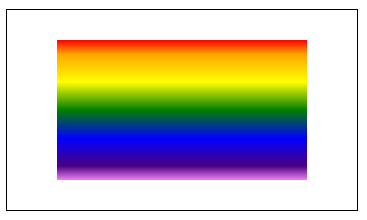
<script type="text/javascript">
var canvas=document.getElementById('mycanvas');
var context=canvas.getContext('2d');
var gradient=context.createLinearGradient(50,30,50,170);
gradient.addColorStop(0,"red");
gradient.addColorStop("0.1","orange");
gradient.addColorStop("0.3","yellow");
gradient.addColorStop("0.5","green");
gradient.addColorStop("0.7","blue");
gradient.addColorStop("0.9","indigo");
gradient.addColorStop(1,"violet");
context.fillStyle=gradient;
context.fillRect(50,30,250,140);
</script>
DrawImage()方法有4個參數:
- 放置圖像的X坐標
- 放置圖像的Y坐標
- 圖像的寬度
- 圖像的高度
- getImageData()方法通過從 Canvas 上指定的矩形里拷貝像素數據,來創建一個圖形數據對象。
getImageData()方法有4個參數:
- 復制的矩形左上角X坐標
- 復制的矩形左上角Y坐標
- 復制矩形的寬度
- 復制矩形的高度
- putImageData()方法用于將指定圖像的像素數據放回到 Canvas 上來。
putImageData()方法有7個參數:
- ImageData 對象
- ImageData 對象左上角的x坐標
- ImageData 對象左上角的Y坐標
- 放置圖像的X坐標
- 放置圖像的Y坐標
- 繪制圖像的寬度
- 繪制圖像的高度
資訊列表